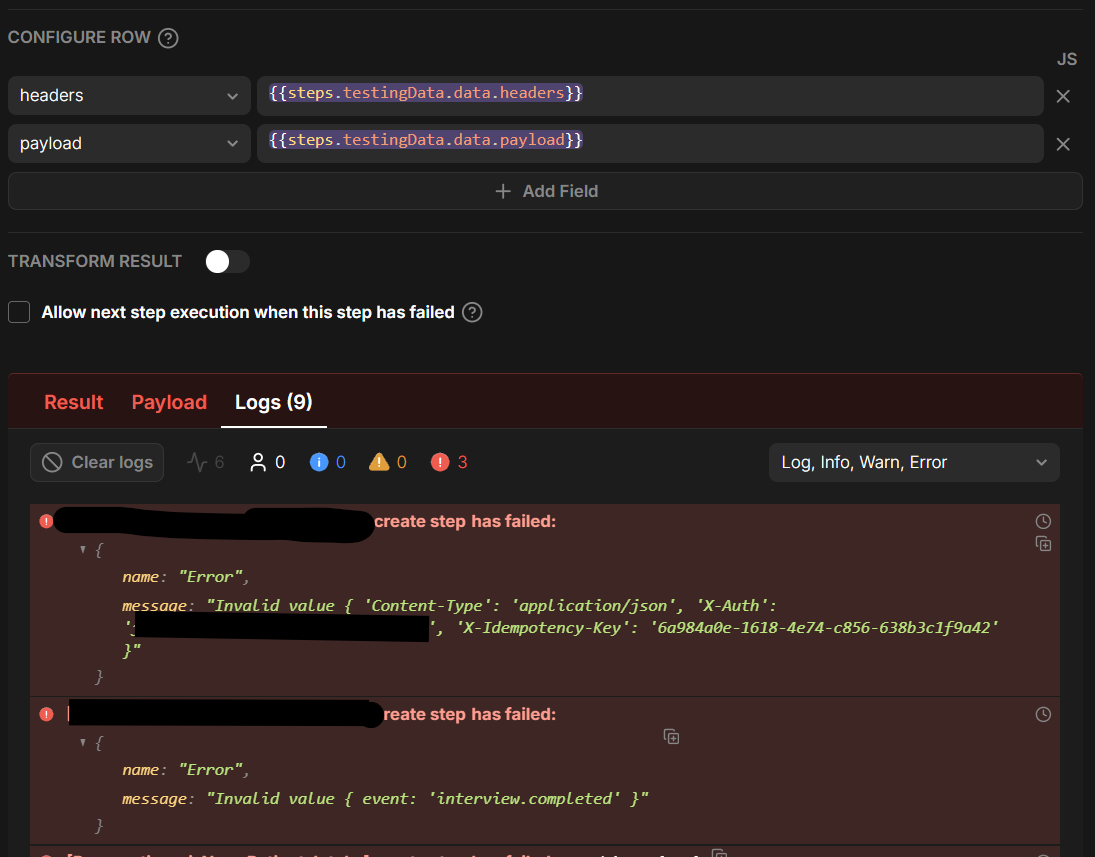
I’ve got data incoming from the very excellent getperspective.ai conversational form builder. I’m hoping to simply store both the ‘payload’ and ‘headers’ objects in JSONB fields in the db, return a success message to the client, and deal with the data later. For testing, I’ve got an initial step with mock incoming data:
const headers = {
  'Content-Type': 'application/json',
  'X-Auth': 'KEYHERE',
  'X-Idempotency-Key': '6a984a0e-1618-4e74-c856-638b3c1f9a42',
};

const payload = {
  'event': 'interview.completed'
};

// Return the prepared data so subsequent steps can consume both payload and headers
return {
  headers,
  payload,
};
I can’t seem to use the GUI “Configure Row” to put the right data in the right fields. I get the simple error “Invalid value” with the object value. I’ve even stripped the JSON object down to just one key/pair value as seen above, and it still doesn’t accept it. If anything, I would think that the Create Row might be cranky if I didn’t have values for non-null fields or something, but that isn’t at all what the errors seem to be pointing towards.
Wondering if there’s something I’m totally missing, or if it’s actually a little bug?
Now I’m running into another roadblock. UI Bakery’s AI Agent has created a TS file for putting the results from catching the webhook—which were put in a staging table—into the actual table where it belongs.
Function ‘processTelnyxWebhookEvent’ needs to be called from my Automation after the ‘Create’ step puts the initial data in the staging table. How do I call this AI-Agent-generated TS file from the Automations UI?
You can’t directly import or call an AI Agent–generated .ts file from an Automation. The Custom App code and Automations run in separate execution environments; Automations do not have access to the app’s source-file modules.
The recommended approach is to move the processing logic into an Actions Library action:
Create an action named processTelnyxWebhookEvent in Actions Library.
Recreate the TypeScript function there using JavaScript Code and/or SQL steps.
In the Automation, add an Execute Action step immediately after Create.
Select processTelnyxWebhookEvent.
Pass the newly created staging row or its ID as custom parameters, for example:
{
  stagingRow: {{ steps.create.data }}
}
Inside the library action, access it as:
const stagingRow = {{ params.stagingRow }};
If the logic is only needed by this Automation, the simpler alternative is to copy the function’s body into a JavaScript Code step directly after Create. Remove TypeScript-only constructs such as interfaces and type annotations.
Actions Library actions are specifically designed for reuse in apps and Automations through Execute Action: Actions Library documentation. Automations run independently on the server in Node.js: Automations documentation.