I have a card with a modal on it generated by the listview, when i try to call it via
{{ui.address_modal.close()}};
it doesn’t close the right modal when calling it here. I’m wondering if there is some type of ambiguity with it
I have a card with a modal on it generated by the listview, when i try to call it via
{{ui.address_modal.close()}};
it doesn’t close the right modal when calling it here. I’m wondering if there is some type of ambiguity with it
I also had an issue where I was getting a value from an input that was on the card that the listview generated, and it was grabbing the value from the other card that wasn’t selected. Both of these actions were using a modal that opened on each card. So my Component stack looks like the following:
tabset > tab1 > listview > card > body > inputs
so for instance, two would generate so we had card[0], card[1], and when calling the input on card[0], i’d get input from card[1], referencing by the input name ( cannot use item.input because item isn’t scoped that far. )
Hi @ZaneLesley,
I’ve placed a ListView with a modal and a text input in my app. Gotta say, there are a lot of things having weird behaviors, and generally several things didn’t work like normal.
But, it’s important to keep in mind that the ListView component is a visual component, a component that was meant to display data and not used for inputs. To quote the documentation:
List view component serves to display the collection of items.
On the other hand, the modal component does provide the functions and structure like other components that are meant to have inputs in them, like {{ui.listView.value}}, {{...children}}, validation variables/functions, etc. This is pretty contradictory, but I can imagine that they had these things ready for other components and just added them to the ListView as well, even though it comes with these issues.
That said, maybe it would be better if you used a different component than ListView. I don’t think any apart from GridView, which would have the same issues, would be what you’re looking for. So the best thing would be to make a custom component.
If you want to stick with the ListView, though, there are solutions for your problems:
About the modals, it seems that in this scenario {{ui.modal}} always refers to the last one visible in the list. But closing the other ones from an action is pretty easy. All you need is:
document.querySelector('.modal-container.visible').classList.remove('visible');
This is basically a universal “close the currently visible modal” action. Doesn’t need anything more, unless you use modals in modals.
If you want to do other things with the modal in the ListView, please let me know and we’ll find a way to make it work.
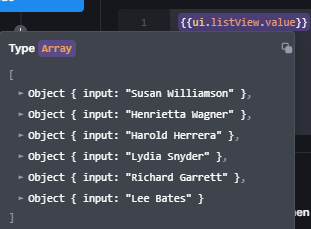
As for the inputs, I think the best way would be to use {{ui.listView.value}} which holds all values for all inputs on the currently visible items in the list. For example, I have a simple text input on the cards, so this variable shows me:
From there you just need to associate the values to the correct items. As I don’t know what the data source of your ListView is and what exactly you want to achieve, that part is on you. But if you need help, don’t hesitate to ask 
I see. It would be nice if UI bakery on creation of the cards for the listView gave each card a unique name (card[i]) so selecting them can be very easy, as you just select the child of card[i] from the index of that card.
The work around to close the modal seems to work.
Are there any other structures you would recommended if im loading data from a database, and just using that return’s object as the data to be shown, and edited. The amount of cards I would need is dynamic as for example, a contact for a company might have multiple contacts so I would need multiple cards.
I think so too. I mean, unless I’m missing something here, this isn’t practical and intuitive to use. @Kate, if you could give some infos from the team’s side on this matter, would be wonderful.
As for other structures, after thinking about it some more, it might not be necessary to use other components.
In your case, for example, you could simply place the modal outside the ListView and hide it. Then just have a button in the cards that runs an action that fills the inputs and whatnot of the modal with the correct data and finally opens the modal.
The inputs inside the cards, on the other hand, I think are manageable with the way I said in my previous reply.
But if you don’t like how that works, I would look away from the Structures category of components and more in the direction of the “Data display” and “Form & data inputs” components. Generally, Tables are good components for both displaying and editing data.
Or make use of the new Custom Components 
Hi @ZaneLesley
Welcome to our Community!
So the behavior you mentioned is a known issue with a ListView component. We have a task for improvement in our backlog and will hopefully fix it soon.
I’ll talk to the product team about our plans to introduce it 
Update on this:
If you want to use it this way, change the modal from hidden to not rendered, and that will leave the modal names unique per page, then just use the code that Max put before for closing the modals.