Interval not running

Similar (the same?) to this other topic: Interval not firing when action called as “execute action” step - Help & Support :laptop: - UI Bakery Community.

Problem: Interval is not executing when the action it is in is called from another action.

Context: I have a REST API that has async functions. You start some work, then need to wait for it to complete. I have an action that uses interval to act as a while-loop with a built in delay, checking the satatus. Then I call that “Wait for Done” action from other actions that start async work.

Details
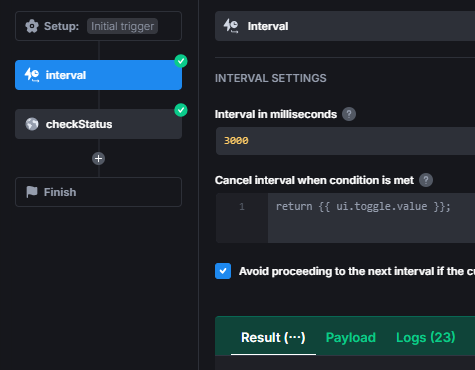
I have an action called “waitForFunctionComplete”:

  • Setup
  • Interval
  • REST API call
  • Finish

The interval looks like this:

The REST API is a GET call to my API. It comes back with a JSON object with a status, and if done, with content. My plan would be to have the status cause the interval to end, but not there yet… The response does come back correctly.

I would expect that when it runs it would infinitely call checkStatus, then wait three seconds, and check again because I have no exit condition. And when I run it from Execute action button that is what happens.

However, I have another action:

  • Setup
  • Save to State (make UI show data is loading)
  • REST API that triggers an asynchronous action
  • Save to State (store the async functions ID so the Wait action can use it)
  • Execute Action (the above “waitForFunctionComplete” action)
  • Save to State (store the results into state for later use)
  • Save to State (make UI show data is done loading)
  • Finish

It will start the async action, then calls the action I described above. The action does get called, gets the correct state to make the status call, and returns a “correct” result.

When I run this action using the Execute action (or when it is triggered by UI action), the interval occurs once (without the 3 second wait) and the response comes back immediately. If the work happens to be done - great all is good. If not, then getting the list of things fails (the work is not done).

I suspect this is a bug in the interval not actually looping as described in the documents: Interval | UI Bakery Docs

I have no dialogs - it is a simple single page at the moment with two Select controls. The goal is to have Select1 trigger an action that generates a list for Select2, and Select2 to trigger this action which would fill a table. Select1 works (REST call is not async so no wait needed), and Select2 fails if it takes too long (that is if the first status call doesn’t come out with “done” and all needed data).
Hi @steven.luke!

We will have a look at your case and get back to you later.

@steven.luke
Could you please export the affected app and send the archive to kate@uibakery.io? We tried to reproduce, but no luck.

Hi @steven.luke,

I’ve tested some things, and the Interval step type really does produce some weird behaviors.

Some questions for you though:

  1. Is there a condition in any step? Not just the Condition step, but also things where you check manually with JavaScript: if, while, etc.?
  2. Since you didn’t set anything for “Cancel interval when…”, I assume you manually stop the actions?
  3. Does the behavior, where it only runs once and immediately stops, occur every execution or just for some?

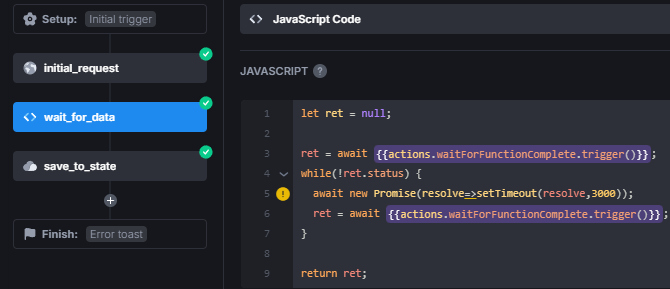
Lastly, I wanted to offer you an alternative. Instead of using the Execute Action step, you could do something like this:

The action “waitForFunctionComplete” only contains the follow-up request that returns the response of the server.

2 Likes

Thanks Kate, I will do that as soon as I can get back to the system, perhaps not today.

1 Like

Hi Max,

  1. No conditions in any of the operations / actions – neither in JavaScript nor the conditional step.

  2. Correct: since I am at the point of just trying to get basics running to see how it works, I do not have any condition to stop. So when I run it I manually stop it with the cancel button. The intent, obviously, would be to get the “done” status from the result of the request and use that to stop automatically.

  3. Yes, I could, and probably will, just run the loop in JavaScript. I am trying to make it as low-code as possible (ideally the results get deployed on systems supported by non-developers) but barring a functional while loop I think I will do something like this.

Thanks again for your response.

2 Likes

@Kate I sent you the email, I had some issues with attachments but think I resolved them. Please let me know if there is more info you nedd.

@Max Thanks again for the JavaScript, I am using a variation of it as below, which gets the job done (and adds a 3 minute local timeout):

start_waiting = new Date()
while(true) {
  await new Promise(resolve => setTimeout(resolve, 1000));
  results = await {{actions.checkFunctionStatus.trigger(params)}};
  if(results.done || results.cancelled) {
    return results
  }
  
  now = new Date()
  msSinceStarting = now - start_waiting
  if(3 * 60 * 1000 < msSinceStarting) {
    return { done: false, cancelled: true, error: "timed out" }
  }
}
return {}
1 Like

Hi @steven.luke
Thank you, I have received it. Sending it to the dev team

Hey @steven.luke
Thank you for the details you provided. We have identified a bug where, on on success trigger, intervals stop executing.

As a workaround, you can run this action at intervals not via on success, but through the last step execute actions within the same action.

In that case, the UI will show that the entire action chain is running, but we suppose that shouldn’t be a big deal.

{{actions.waitForSearchComplete.cancel()}}

This call can be used to stop it all whenever needed.
We have created a ticket to fix the mentioned issue and will let you know once it’s fixed.

2 Likes

I see. So I have

UI (event) → Action (onSuccess) → Action (executeAction) → Action with Interval

It is that first Action’s onSuccess that needs to be replaced with an executeAction so it becomes:

UI (event) → Action (executeAction) → Action (executeAction) → Action with Interval

I can confirm that that change does indeed make the workflow work as expected. Thanks!

2 Likes