Hello everyone.
In the last couple of months, there have been discussions about app versions. How to access them, display them, etc. One thing I’ve mentioned in one answer was that there is a way to get the app version for apps, even specifically production and staging versions. I want to keep this short, so let’s get straight into it.
This only works for self-hosting (on-prem)!
- Since we’re self-hosting, we have access to the database the UIBakery application is using. You can always check that out by using
sudo docker exec -it db bashto access the Docker container where the DB is. Then withmysql -u bakery -pand passwordbakerywe can access MySQL. - After selecting the database with
USE bakery;we can get the versions of each app with this query:
ReplaceSELECT version FROM `release` WHERE id = ( SELECT MAX(r.id) FROM `release` r JOIN project AS p ON p.id = r.project_id WHERE r.automatic_backup = 0 AND p.name = "<App name>" -- AND p.prod = 1 -- AND p.staging = 1 );<App name>with the name of your app. If you specifically want theprodandstagingversions, you can uncomment the appropriate line at the end of the query.
Do with that what you will. There are many possibilities out there to call that query from inside UIBakery. For example, and as a showcase that it works, I quickly set up a Node.js server that runs the query and returns the results.
*Here is the code of the route if anyone is interested:*
NodeJs route code
APP.get("/getVersion", (req, res) => {

    const tableName = req.query.name;

    if (!tableName || typeof tableName !== 'string') {
        res.status(400).send("No table name provided");
        return;
    }

    const command = `
        echo ${process.env.sudoPass} | sudo -S docker exec db /bin/sh -c "mysql -u bakery --password=bakery -D bakery -e 'SELECT version
            FROM \\\`release\\\`
            WHERE id = (
                SELECT MAX(r.id)
                FROM \\\`release\\\` r
                JOIN project AS p ON p.id = r.project_id
                WHERE r.automatic_backup = 0
                AND p.name = \\\"${tableName}\\\"
            )'"
    `.trim();

    exec(command, (err, stdout, stderr) => {
        if (err) {
            console.error(`exec error: ${err}`);

            res.send("Could not execute command: " + err);
            return;
        }

        // the *entire* stdout and stderr (buffered)
        console.log(`stdout: ${stdout.replace(/version\s/, "").trim()}`);
        console.log(`stderr: ${stderr}`);

        const ret = {
            stdout: stdout.replace(/version\s/, "").trim(),
            stderr: stdout.includes('version') ? "" : stderr.trim()
        }

        res.send(ret);
    });
});
Inside UIBakery I can now create a new action with a `HTTP API` step accessing the route with the current app name:

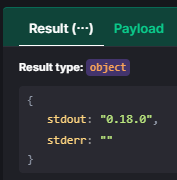
And I’ll get
Might help some people out there until we have {{ app.version }}.