I’m trying to display just icons (Eva Icons, no title) instead of a numeric value in a table column, possibly with different colors.
Like 1 => running (activity) and 0 => stopped (all-done)
Using Select/tag column type and the tag mapper doesn’t seem to work.
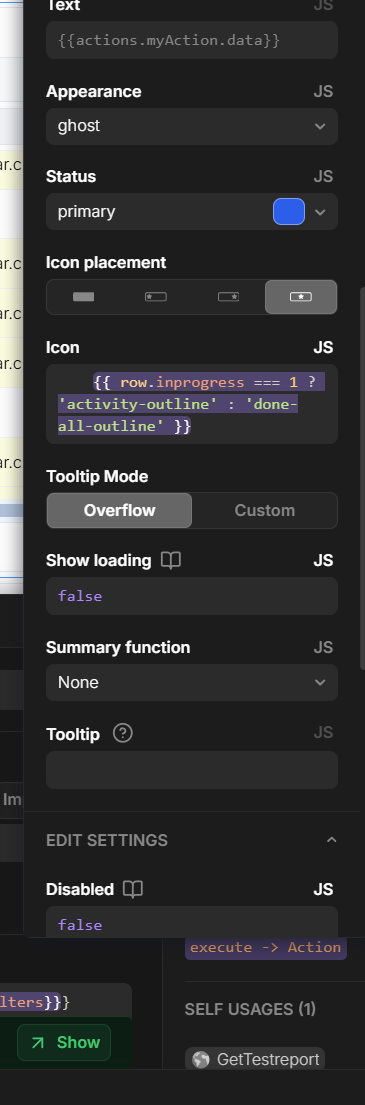
Now I’m playing with buttons, trying to dynamically change the icon, but nothing is displayed.
I had actually implemented it like this (wrong icon-name was just a typo in the post).
The icon still doesn’t show. I can’t set the “text” field really to empty. I still shows a greyed out default object.
I removed the condition in the icons field just to see if an icon displays at all. No luck.
@theuken good that you made it work. Just for your information:
You, in fact, did set the text field to empty. The “greyed out default object” is just a placeholder for that field, showing an example of what could be entered.
It’s not weird at all that it didn’t work with the spaces in front. Essentially instead of the 'activity-outline' icon you were requesting a ' activity-outline' icon, which obviously doesn’t exist
which he says does not exist obviously, instead of what you wanted like
'icon-name'
which is created by
{{ icon-name }}
(notice the no spaces in front of the curlies)
That is because that text field is expecting to output a string, so if I’m not mistaking, it treats everything from position 0 as part of the string, regardless where you start the curlies. I always trim around the curly brackets to avoid this issue, like so:
let icon_name = 'this is output';
return {
 a: ({{ icon_name }}).trim(),
 b: (     {{ icon_name }}).trim(),
 c: (  {{ icon_name }}  ).trim()
}

// output
a: "this is output",
b: "this is output",
c: "this is output"