Hello,
In my application, I have 2 actions :
one is “Javascript” called “actionA”
another is a SQL action called “isValid”
In my actionA action I have code like
const jEmail = "'abcd@organization.org'";
console.log("Email being passed:", jEmail);

// Log the params before triggering the action
const eParams = { email: jEmail };
console.log("Params being passed to isValid:", eParams);

// Step 1: invoke isValid action
const val = await actions.isValid.trigger({
  params: eParams
});
In my isValid action i have a very simple query like
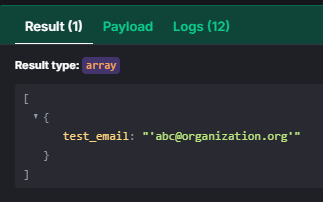
SELECT {{params.email}} AS test_email
When i execute the first action, the payload in “isValid” looks like
You are misunderstanding what you need to pass in trigger(). It isn’t necessary to pass an object with a params property, since the {{params}} variable represents exactly the value you pass to trigger().
So, for example, if you have something like
const bla = {params: {email: "'abcd@organization.org'"}};
await {{ actions.isValid.trigger(bla) }}
then the {{params}} variable in the isValid action is exactly the same as the bla variable. So to access the email, you would need to write {{ params.params.email }}
You could just test this yourself by triggering a different action that looks like
return {{ params }};
and you would see the structure of the variable.
In the end, this is what you need to do to make the code you posted work: