Our team would like the text in the internet broswer tab be updated based on a value from the current page/view they are on. They regularly have multiple tabs open to different jobs and other processes that they are working between. They would love to be able to see which tab is which without having to click into them. Does anyone know a way to do this?
Hello @chTim,
EDIT: I forgot that this will only work if you have the On-prem version. It will not work on the cloud version!
Natively in UI Bakery it’s not possible, but you can change the title of the current tab using this inside an action:
window.parent.document.title = 'Your new title!';

What I recommend doing, is making an object on the App level, either in a JS file or as a State variable if you want to dynamically change the tab titles while someone is working on the app.
Example JS file
-
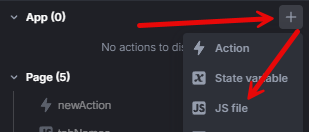
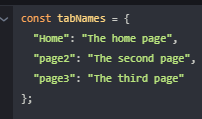
Create a JS file on the app level, in which you define a object where the keys are the names of the pages and the values are the title you want them to have:
-
Create a new Action with a Javascript code step, still on the App level, and add the code to change the page’s title:
window.parent.document.title = tabNames[{{activeRoute.name}}]; -
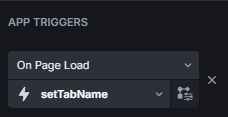
Add the Action as “On page load” App trigger
If everything is set up correctly, now the tab names should change when switching pages.

Example State variable
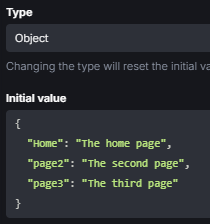
Doing this with a State variable works the same as with the JS File. Instead of a JS File, create a State variable with the object type and enter the page name (key) → title (value) pairs
In the action that changes the tab, make it get the title from the State variable:
window.parent.document.title = {{state.tabNames[activeRoute.name]}};
At this point, setting it up the same as with a JS file, it should already work, but now you can at any point change the titles:
{{state.tabNames}}.Home = 'New home title!';
Thanks Max. Really appreciate it. Currently we are running the cloud version. So that is a bummer. I realize it is because UIB wraps the app in an iframe when cloud deploying it.
HOWEVER, I’m actually currently embeding the app into a page of another app of ours for easy access by our team. Beacuse of this I realized I could add a message listener in my host page and post to it from an action in UIB. This works but if you something in a new tab it is no longer wrapped and then doesn’t work.
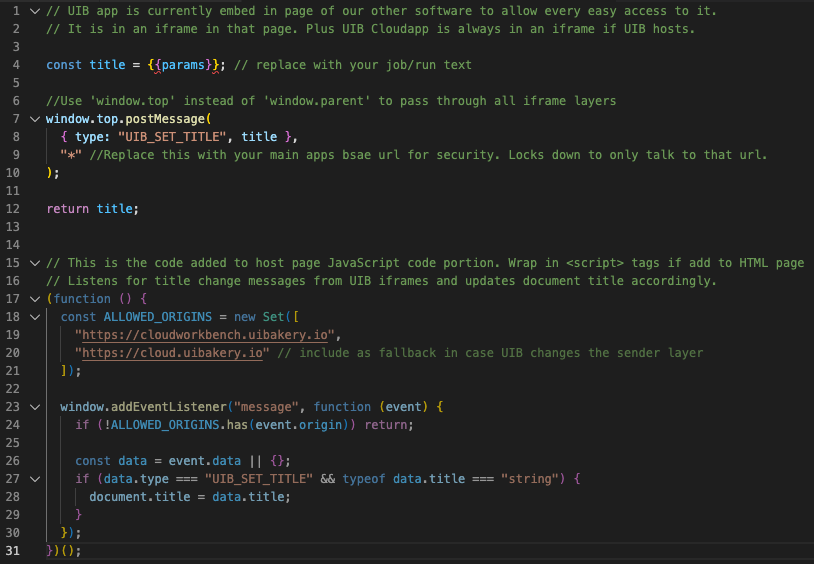
1 Like
Yes, but that’s only halfway to the issue. In the On-prem version, the app is also wrapped in an iframe. The issue arises when the src of the iframe is from a different domain than the top document.
But fascinating to see what you’ve come up with! This is actually big news, as I didn’t known how to do cross-domain stuff before, tyvm!
Little update on this @chTim, and believe me, you’ll laugh.
So, in the settings to the right (where you configure components etc.), if no component is selected, it shows general settings of the app/page. Normally, all I do here is setting app/page triggers, but today I noticed a different setting:
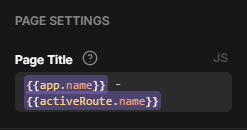
It was literally there in plain sight the whole time. Can’t believe I never saw that.
You already made it work in your own way, but if anyone in the future comes here for help or anything… here we go lol.